

Mini PC
The Mini PC drives the fixed screens on board: iNav4U touchscreens, ordinary monitors, or a mix. It comes with its system installed. When it starts, it finds the main unit on the boat's network by itself and opens Zora on every screen connected to it.
To install it, follow Mini PC, once the main unit is online.
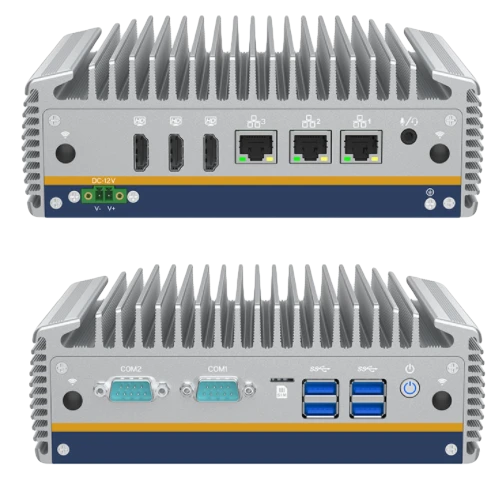
Screens
One Mini PC drives up to three screens, one on each HDMI port, at up to 4K and 60 Hz. The screens work independently: each shows its own station, so the helm and the chart table can each have their own layouts, and a touchscreen works only the screen it is assigned to. A boat that needs more screens can have more than one Mini PC.
Connections
| Connector | Use |
|---|---|
| 3 HDMI | One screen each |
| USB | The touch cable of each touchscreen, or a keyboard and mouse |
| Ethernet | The boat's network, to reach the main unit |
| Power | 9 V to 36 V DC, screw terminal |
| Power switch | Shuts the Mini PC down cleanly |
The Mini PC starts whenever power is applied, so switching the breaker back on restarts it. To stop it, use its power switch rather than cutting the power. Use a supply that delivers at least 10 A at 12 V; a weaker one may not start it reliably.
Specifications
| Processor | Intel Core i7, fanless |
| Memory | 16 GB |
| Video | 3 HDMI, 4K at 60 Hz |
| Network | 3 Ethernet ports, Wi-Fi and Bluetooth |
| Other ports | 2 serial (COM), 4 USB 3.2, audio |
| Supply | 9 V to 36 V DC |
| Operating temperature | -20 °C to 50 °C |