

Emergency
The EMERGENCY button in the app bar opens the emergency list: person overboard, the radio calls, and what to do about a fire, a medical problem, a leak or an intruder. It is on every screen, in the full bar and the small bar.
The EMERGENCY button
- Tap EMERGENCY to open the Emergency list in the Tools panel. Tap it again to close it. If the Tools panel is showing something else, the tap switches it to the emergency list.
- On the small bar the button reads emergency.
The button blinks once a Mayday or a Pan-Pan has been sent, until the call is cancelled. See Distress Call.
While a person overboard alarm is on, a POB active button sits beside it. Tap it to go straight to the person overboard screen. See Person Over Board.
The emergency list
Tap a row to open it.
| Row | What it opens |
|---|---|
| POB | Raises the person overboard alarm at once. See Person Over Board |
| Mayday | The Mayday call. See Distress Call |
| PanPan | The Pan-Pan call |
| Securité | The Sécurité call |
| Mayday Relay | The call to relay a Mayday you heard from another vessel |
| First Aid | Your first aid kit on the Equipment screen |
| Fire On Board | The fire screen. See Fire On Board |
| Hull Leak | Your hull plugs on the Equipment screen |
| INTRUDER | Your security screen. See Intruder |
DANGER
POB raises the alarm with one tap. There is no question first.
The Mayday and PanPan rows turn red and orange once the call is sent, and show sent at: with the time. While a person overboard alarm is on, the POB row turns red and says who is in the water, if Zora knows.
Communication
The four radio calls open the Communication panel beside the call, with your vessel's details: the vessel name, the MMSI, the skipper, the skipper's phone number and the VHF and HF call signs. A line you have not filled in is left out.
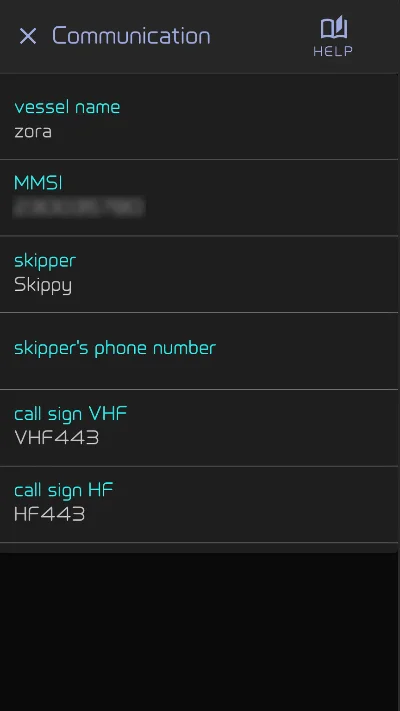
- Tap the vessel name, the skipper or a call sign to show it in large letters with its phonetic spelling, to read over the radio.
- Long-press a line to change it.
Fire On Board
The fire screen holds:
- Activate Fire Alarm: raises a fire alarm, Emergency - Fire On Board, with its sound, and writes it in the logbook. The button then reads Cancel Fire Alarm. If the alarm could not be raised, Zora says Fire alarm could not be raised.
- Locate Fire Extinguisher: opens the vessel map, to show where the extinguishers are.
- What to do about a fire, on board and underway.
Tap ✕ to go back to the screen you came from.
Intruder
INTRUDER opens your own security screen, with your camera feeds, siren switches and other controls. Until you have made one, it says No security screen configured yet. and offers Open Screen Management to make it. See Your own emergency screens.
First Aid and Hull Leak
First Aid and Hull Leak open the Emergencies folder of the Equipment screen, at the first aid kit and at the hull plugs, with what you have recorded there.
Your own emergency screens
Four rows open a screen you build yourself instead, as soon as one exists with the right name:
| Row | Name the screen |
|---|---|
| First Aid | EMERGENCY-FirstAid |
| Fire On Board | EMERGENCY-Fire |
| Hull Leak | EMERGENCY-HullLeak |
| INTRUDER | EMERGENCY-Intruder |
Capital letters do not matter. Build the screen as any other custom screen, with the checklists, cameras and switches your boat needs. Your screen replaces Zora's: with an EMERGENCY-Fire screen, the fire screen and its Activate Fire Alarm button no longer open from the list.