

Autopilot
Every supported autopilot is steered from Zora with the same buttons. The pilot's own control head keeps working the whole time and stays your override.
Open the autopilot drawer
Press the tools button (titled with the vessel state) at the top right, then the round icon at the top right of the drawer that opens, and pick the helm. The drawer has three tabs: autopilot, TWD and response.
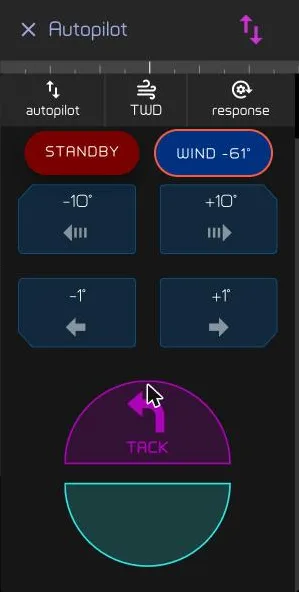
STANDBY stands the pilot down. Beside it is the mode button, which reads the mode the pilot is in and the angle it is holding. −10° / +10° and −1° / +1° trim that angle to port and starboard. TACK turns the boat through the wind.
Choose which pilot steers
Press the select AP dial on the autopilot tab. It fans out every pilot the boat has, plus SEMI AUTO, which is Zora steering by suggestion instead of by a pilot.
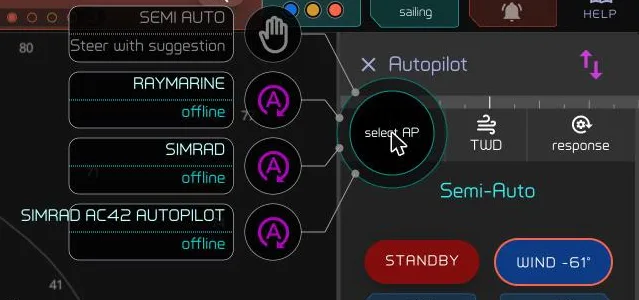
Press one and it becomes the active pilot. The choice is remembered across restarts and is captured by a standard Zora backup.
A pilot that is no longer answering reads offline under its name. You can still pick it: the choice is parked and takes effect when the pilot answers again.
A pilot you switch off reads offline within about a minute. Until then it can still show as available.
Steer
Press the mode button to engage. The pilot holds either the heading you are on or the wind angle you are sailing, depending on the mode. Trim with ±1° and ±10°. Press STANDBY to hand the boat back.
A change made at the pilot's own control head shows up here too.
Related
- Setup: Autopilot — fitting a pilot and adding it to the boat's equipment.
- Autopilot compatibility — which pilots work with Zora.