

Autopilot
For almost every autopilot, the install is the bus and nothing else. Put the pilot on NMEA 2000 and Zora finds it. There is no brand to pick and no device ID to type in, because the pilot says what it is and Zora reads that.
Some makes need more than that, and each has its own section below. A Raymarine SmartPilot is on SeaTalk1 and needs a converter.
Most autopilots
- Wire the pilot to the NMEA 2000 backbone the way its manufacturer specifies.
- Power it up.
- Open Zora on the boat's screens and check the pilot is in the list.
That last step happens in the Zora app, not in Setup: see Autopilot in the Zora guide. Then add the pilot to the boat's equipment, below.
Before you leave the boat, confirm the pilot is selectable and that Zora shows the mode it is in. A pilot Zora can see but cannot command still appears in the list, marked as not supported.
Which pilots Zora can command, and what it can do with each, is in Autopilot compatibility.
Some makes need more than the bus. Each is below, with what it needs and what to check when it does not answer.
Raymarine Evolution
Heading hold, wind hold, and 1° / 10° trim. Works on the bus as fitted.
Required
- The unit on the bus in its own right. An SPX is driven as an Evolution when it is on NMEA 2000 itself, over SeaTalk1 when it is behind an E22158 converter.
If it does not work
The pilot steers but Zora shows no mode
On a few units the mode report never appears on the bus, so there is nothing for Zora to display. Steering is unaffected, and the mode shown at the pilot's own head is correct. Contact support and we can arrange a session aboard to record what the unit puts on the bus and work out its mode report. Once Zora can read it, the mode on screen follows the head within a second.
Simrad AC42
Heading hold, wind hold, and trim at any angle.
Required
- A control head commissioned into the AC42, such as one of its OP10 keypads, for Zora to send its commands as. The AC42 acts only on commands from a commissioned head's address, and it ignores an exact copy of that head at any other address. Heads are commissioned in the pilot's own setup at the dock and cannot be added over the bus.
- That head's address set in Zora's autopilot settings on the server during commissioning. It is entered by hand, because no screen sets it yet.
If it does not work
Zora sends a command and the boat does not turn
The AC42 acts only on commands that come from a control head commissioned into it. Until Zora is set to send as one of those heads, the pilot ignores what Zora sends. Contact support with the boat's control heads, and we set Zora to command as one of them.
Garmin Reactor
Heading hold, wind hold, and 1° / 10° trim.
Required
- The GHC control head switched on whenever Zora is to steer.
If it does not work
Zora accepts a command and the pilot does not move
With the GHC control head switched off, the Reactor acts on no command from Zora, and Zora reports no error. Switch the head on at the helm and send the command again, and the pilot takes it.
Garmin GHP 20
Heading hold and trim at any angle. Wind hold is in Zora and has not been tried on a boat.
Required
- The GHP 20 course computer on the NMEA 2000 bus, reporting itself as a GHP 20. A Garmin Reactor on the same bus reports a different model and is driven as a Reactor.
Raymarine SmartPilot and SPX
Heading hold, wind hold, and 1° / 10° trim, through a Raymarine E22158 converter with an install that is easy to get wrong.
Zora addresses the converter and the converter relays to the pilot, which is why the autopilot list shows the converter's name rather than the pilot's.
Which Raymarine path a unit takes is decided by what it reports on the bus, not by its model name. A unit on NMEA 2000 directly is covered by Raymarine Evolution.
Required
- The converter's SeaTalkNG backbone powered through the kit's own SeaTalkNG power cable, at 12 V.
- A terminator at each end of that backbone. The kit ships two.
- Zora connected to a white spur socket off that backbone. The blue sockets are the backbone itself.
- The SeaTalk1 bus plugged into the converter's one yellow socket.
- For wind hold, a wind instrument on the SeaTalk1 side of the converter. The pilot engages wind mode only when wind data is on its own SeaTalk1 wire.
Crew card: the converter, socket by socket
What Zora does with it
- Zora finds the pilot through the converter on its own, with nothing to configure.
- Zora commands the pilot without putting a control head of its own on the bus.
- When nothing else on NMEA 2000 sends apparent wind and Zora has some, Zora sends it onto the bus once a second for the converter to carry down to SeaTalk1, whichever pilot is selected.
- Engaging heading hold again after standby leaves the rudder near centre.
What Zora will not do
- Only the 1° and 10° steps exist on this wire, so a trim of any other size sends the pilot nothing.
- The pilot never reports the wind angle it is holding. In wind hold the angle Zora shows is Zora's own record, moved by each trim Zora sends.
- The pilot does not reliably confirm commands, so Zora raises no alarm when one goes unconfirmed. The command is still recorded as unconfirmed.
If it does not work
Zora lists no autopilot
The converter is the only part of this pilot on NMEA 2000, and it stays off the bus until its SeaTalkNG backbone is complete. Check that the backbone has power from the kit's SeaTalkNG cable, that the converter is not also powered from the SeaTalk1 side, that there is a terminator at each end, and that Zora is on a white spur socket rather than a blue one. Once the converter is on a working backbone, Zora finds it without any setting and the pilot appears in the list.
The pilot is listed, but commands do nothing
Zora sees the converter, so the pilot is listed, but nothing reaches the course computer behind it. Check that the SeaTalk1 bus is in the converter's yellow socket. The list can also go on showing the pilot online after the converter has lost power or left the backbone, and because this pilot's missed confirmations raise no alarm, the commands simply go unanswered. In that case check the converter's power and backbone as for a missing pilot.
Wind hold never confirms
The pilot holds a wind angle only from wind data on its own SeaTalk1 wire. A wind sensor that reaches Zora some other way, such as over NMEA 0183, does not count. Heading hold keeps working. Fit a wind instrument on the SeaTalk1 side of the converter, and wind hold engages from Zora like any other mode.
Add the pilot to the boat's equipment
This is done in the Zora app.
The pilot also belongs in the equipment register, where its maintenance, its documents and its NMEA 2000 record live. Press SCREENS, open the EQUIPMENT tab and pick Assets.
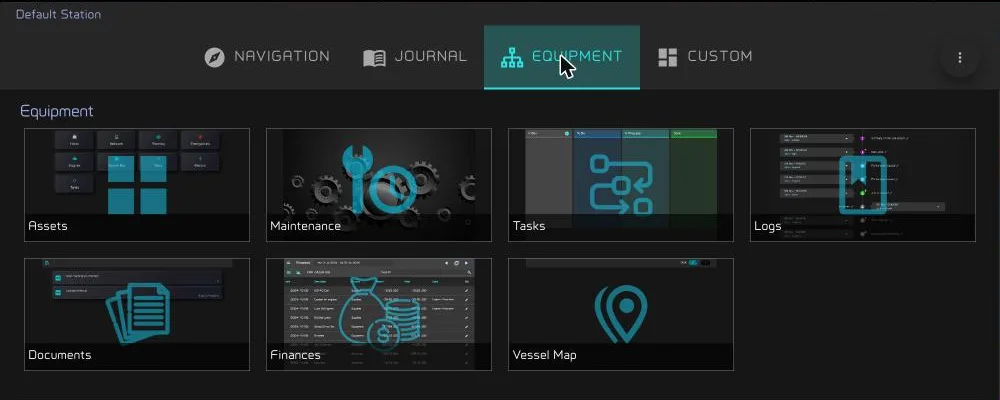
Then open Steering → Autopilot. Wake the pilot first, then press the round scan button below the +.
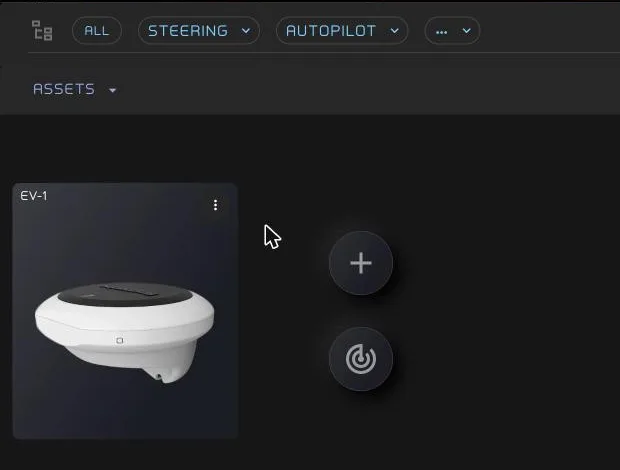
Zora looks at the bus at that moment and creates an entry for every pilot that has none yet. Scanning again cannot produce a duplicate.
If you had already made an entry for the pilot by hand, the scan claims that one instead of creating a second beside it. That only happens when there is one pilot of that type on the bus and one item waiting for it. Where there is any doubt, Zora creates a new entry, because a wrong match would attach running hours and service history to the wrong unit.
The entry carries the pilot's NMEA 2000 record, read off the bus: manufacturer, model, serial and software version. An autopilot Zora cannot drive is listed too, marked as not supported. The register is an inventory of what is fitted, not of what Zora can command.
Related
- How Zora finds an autopilot — what counts as a pilot on the bus, and why one unit is one entry.
- Zora: Autopilot — choosing the pilot and steering with it every day.