NMEA 0183 (RS-232 / RS-485)
The server's serial ports take an NMEA 0183 instrument on RS-232 or RS-485. An RS-485 line can also carry Modbus relay boards, which Zora switches itself. This page covers both.
Which port
Wire the instrument to the port its output needs.
- RS-232: on a Main Unit V3 the built-in port is pins 11 (RxD), 12 (TxD) and 14 (common) on the Industrial I/O connector.
- RS-485 is a pair of wires. It runs up to about 1200 m and carries several devices on one line. On a Main Unit V3 the built-in port is pins 7 (D−), 8 (D+) and 10 (common). If the server is at one end of the line, join pin 9 to pin 10 to switch on its 120 ohm terminator.
Relay boards go on RS-485 only. An RS-232 port has no relay section.
The full wiring is on the hardware page for your server: Main Unit V3 or Main Unit V2.
Open the port
- Open the Setup app and tap Connections & Sources.
- On a Main Unit V3, tap the Connections tab. A Main Unit V2 opens on it.
- Tap the card RS232 / NMEA 0183 or RS485 / Modbus. A module with several ports numbers them, as in RS485 / Modbus (2).
On a Main Unit V2 the one serial port runs RS-232 or RS-485, and its card carries the name of the mode it runs now. To change it, pick RS232 or RS485 beside Port mode at the top of the dialog. The port changes over when Zora restarts. Tap Restart Zora Now to do it straight away.
An RS-232 port with nothing set up to read it says No input configured on this connection. and has no settings. An RS-485 port in that state shows only its relay section.
Read an NMEA 0183 instrument
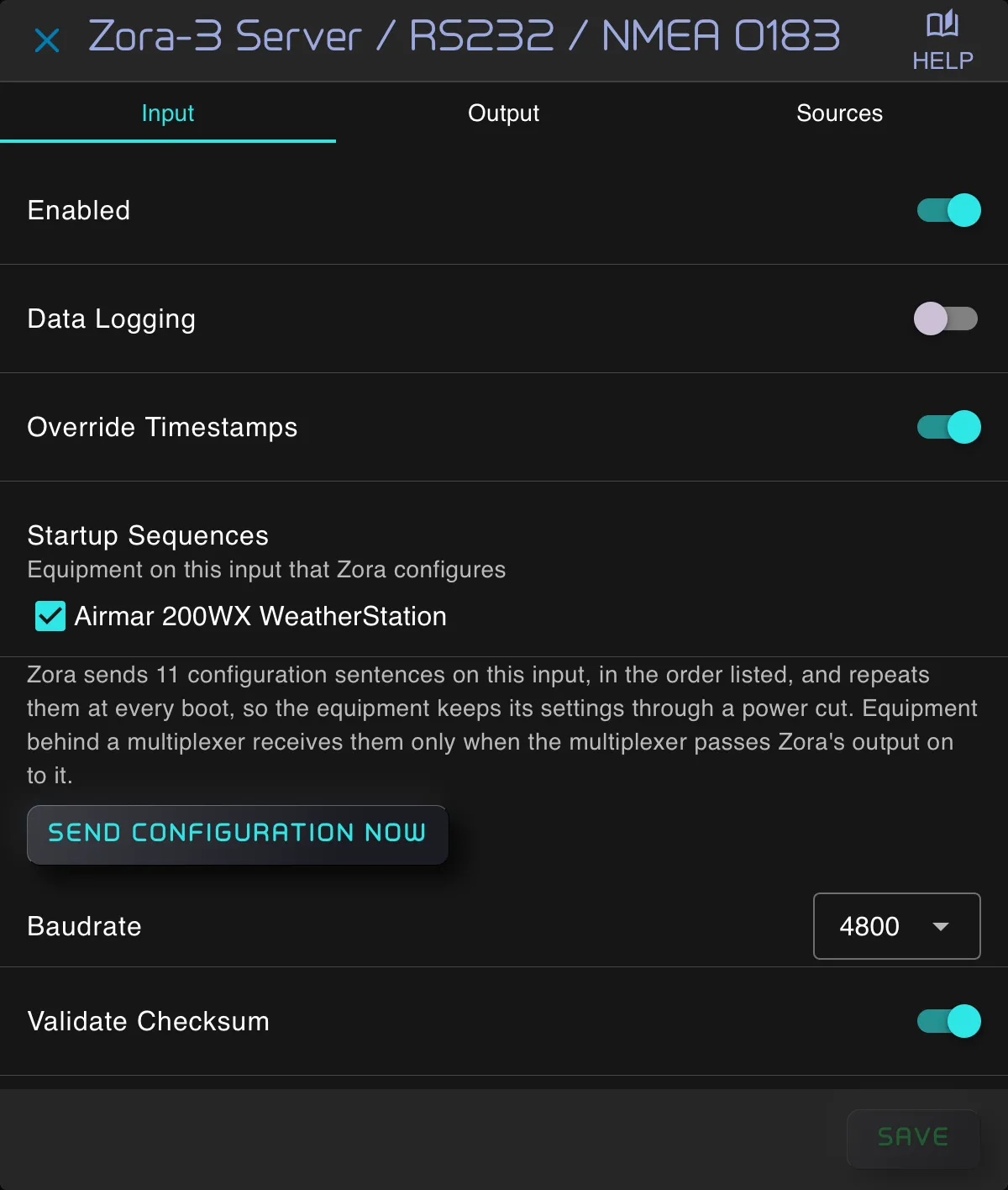
| Setting | What it does |
|---|---|
| Enabled | Turns reading the port on and off. |
| Startup Sequences | The equipment on this input that Zora configures. See below. |
| Baudrate | 4800, 9600, 19200, 38400, 57600, 115200 or 230400. Match the instrument. |
| Validate Checksum | Checks the checksum on each sentence. |
| Data Logging | Records this port's raw data to a log on the server. |
| Override Timestamps | Has no effect. Zora always stamps incoming data with the server's clock. |
On an RS-485 port these settings sit below the relay section.
Startup Sequences
Baudrate sets up the port. Startup Sequences lists the equipment Zora can configure, one checkbox each. The list holds the Airmar 200WX WeatherStation.
Tick each piece of equipment on the input that needs configuring, or leave them all clear. A multiplexer can put several instruments on one input, so any number can be ticked. Zora reads the input the same way whatever is ticked, and ticking leaves Baudrate as it is.
With something ticked, the dialog says how many configuration sentences Zora sends. Zora sends them in the order listed, and again at every start, so the equipment keeps its settings through a power cut. Equipment behind a multiplexer gets them only if the multiplexer passes Zora's output on to it.
Saving only records the choice. To send the configuration straight away, save, then tap Send Configuration Now. Until you save, the button is inactive with Save first beside it. Afterwards it reports Sent and the number of sentences, or the error.
The Output tab sets what Zora writes out of the port. Choose Off, All sentences or Chosen sentences, and pick them from the list of sentences Zora makes.
Tap Save, then check the Sources tab for what the port hears.
Relay boards on RS-485
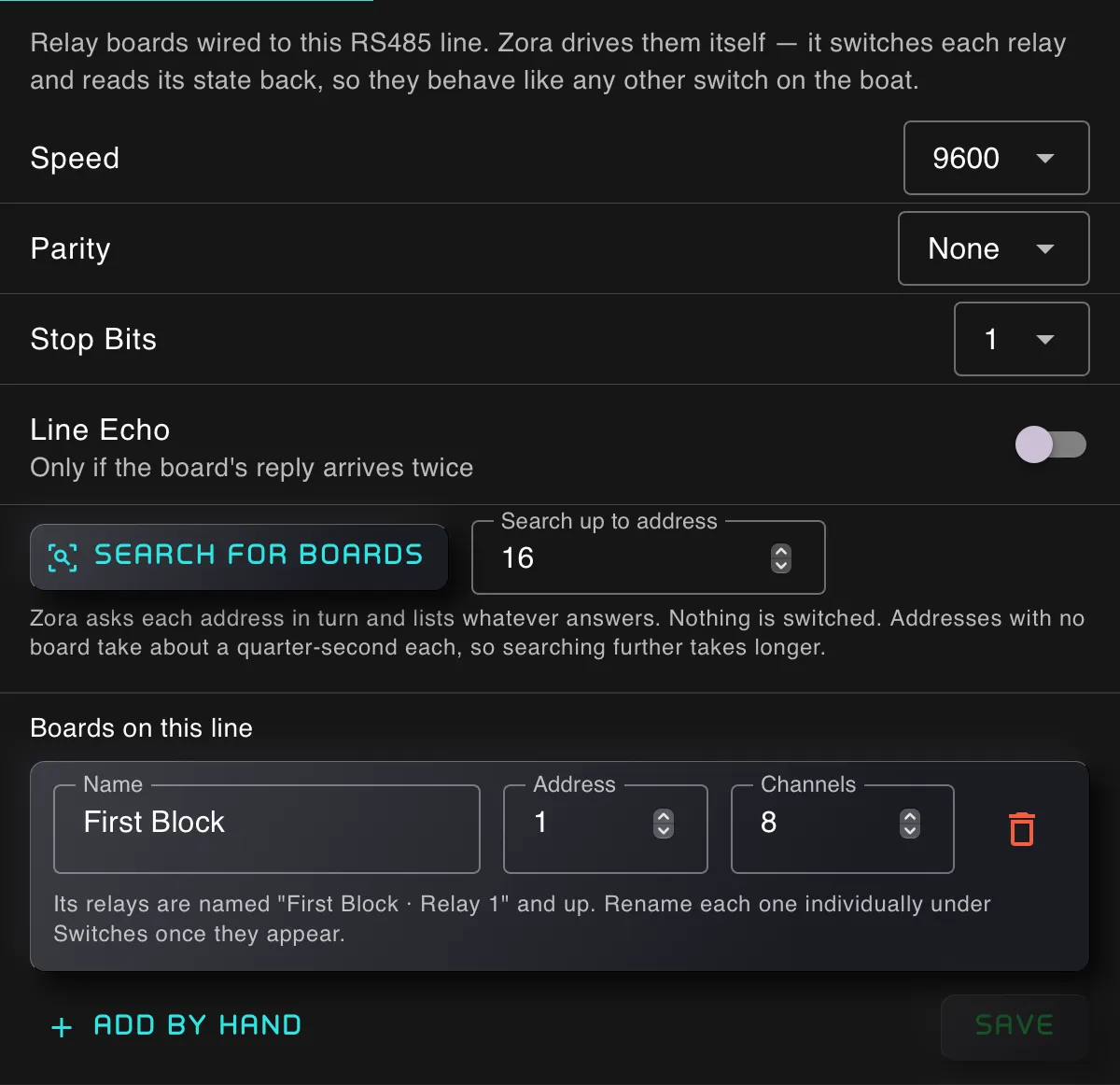
Zora drives Modbus relay boards on an RS-485 line itself. It switches each relay and reads its state back.
Set the line
| Setting | Options | Starts at |
|---|---|---|
| Speed | 1200 to 115200 | 9600 |
| Parity | None, Even, Odd | None |
| Stop Bits | 1 or 2 | 1 |
| Line Echo | on or off | off |
A new line starts at the factory settings of the boards Zora supports. Turn Line Echo on only if the board's reply arrives twice.
Find the boards
- Set Search up to address. It starts at 16 and goes up to 247. Each address with no board takes about a quarter of a second, so a wider search takes longer.
- Tap Search for Boards. Zora asks each address in turn. Nothing is switched.
- Each board that answers shows as Board at address and its number, with the channels it answered for. Tap Add to keep it. A board you already have reads Added.
Check the channel count against the board: some boards answer for more channels than they have.
If the dialog says No boards answered., check the wiring, the board's power, and that its speed matches Speed.
Name the boards
Each board has a Name, an Address (1 to 247) and Channels (1 to 32). Add by hand adds a board at the lowest free address with 8 channels, for one whose address you already know.
Relays take the board's name, as in "Deck lights board · Relay 1". Rename them one by one under Switches.
The relay section has its own Save, inactive until something changes. The card then shows a chip such as Modbus · 8 relays. Removing every board frees the line.

Leave Setup
When you leave Setup with Back to Zora after a save, Setup asks Restart Required. Tap Restart & Go Back. After the restart the new relays are in the switch list. Stay in Setup keeps you in Setup, for more changes first. See After you save.