Switches
Zora switches circuits from two kinds of equipment: a digital switching system on NMEA 2000, and the relays of a Modbus board. Before the crew can use them, each switch needs a name. That, and a check that Zora reads the switching devices correctly, is done on the Switches tab.
What each switching system needs on the boat is in Digital switching compatibility. For CZone: Third-party mode enabled on the CZone network with the CZone Configuration Tool, and a bank instance of its own for every other device sending switch banks. For control: any circuit set to Toggle in CZone switched from a Zora switch in pulse mode, since a Toggle circuit ignores a plain off; On/Off circuits need nothing. A relay board on RS485 is set up first under Relay boards on RS-485.
Open the Switches tab
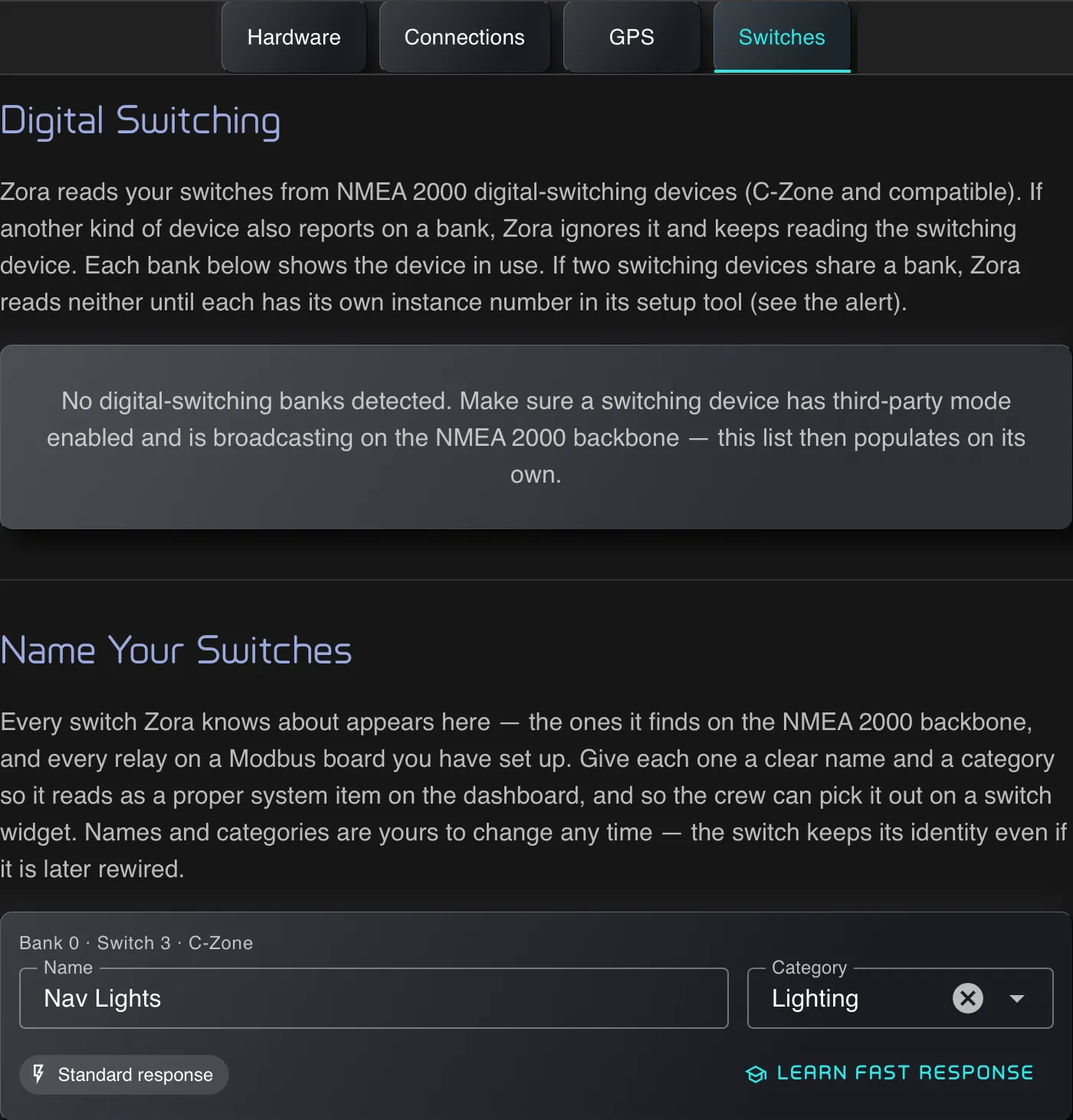
In the Zora Setup app, tap Connections & Sources, then the Switches tab. It holds Digital Switching above Name Your Switches.
Check the switching banks
Digital Switching has a card for each bank Zora sees on NMEA 2000, with the brand and the device. It refreshes every few seconds, so you can watch a change on the bus while you make it.
| State | Means |
|---|---|
| Resolved | one switching device owns the bank, and Zora reads it |
| Not reporting | the bank is known, and its device has gone quiet |
| Detecting… | Zora has seen the bank and is still working out which device owns it |
| No circuits | a switching device sends this bank, but no circuit is assigned to it |
| No switching device | only other equipment, an inverter for one, sends on the bank. Zora ignores it and names what it hears |
A device that is not a switching system but sends on a bank, such as an inverter, is ignored.
For No circuits, assign the circuits in the tool that configures the device. For CZone, follow Set up CZone for Zora. If Zora hears CZone modules but none of them shares a circuit, a note above the banks says C-Zone modules found, no circuits shared and lists the modules by dipswitch. The fix is the same.
Two switching devices on one bank show a warning in place of the card, two switching devices share this bank, naming both. Zora does not choose between them, and that bank's switches stop updating until it can. Give each device its own instance number in the tool that configures it; for CZone, the CZone Configuration Tool.
No digital-switching banks detected means no switching device is broadcasting. Check that it is on the backbone and, for CZone, that each module has a switch bank (step 1 of Set up CZone for Zora). The list then fills on its own.
Set up CZone for Zora
Zora sees a CZone circuit once it is on a switch bank. Your installer sets this up in the CZone Configuration Tool, or you can, with a laptop connected to the CZone network.
Open the Advanced tab, then Third-Party Devices. Under Switch Bank PGN Control, click Add and give each module a bank with its own instance number. Leave the advanced remote control box unticked.
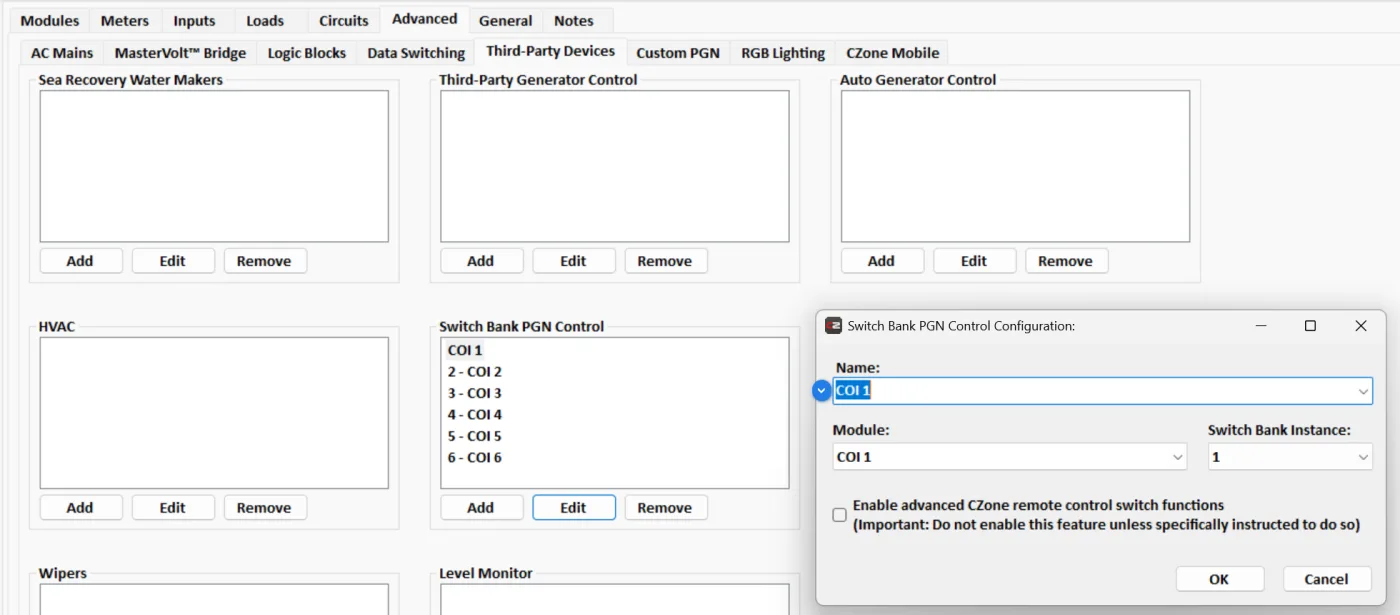
Switch Bank PGN Control in the CZone Configuration Tool, one bank per module Open the Circuits tab. For each circuit Zora should switch, click Add under Circuit Controls, pick the module with the bank, and set Switch (Output) Function to On/Off.
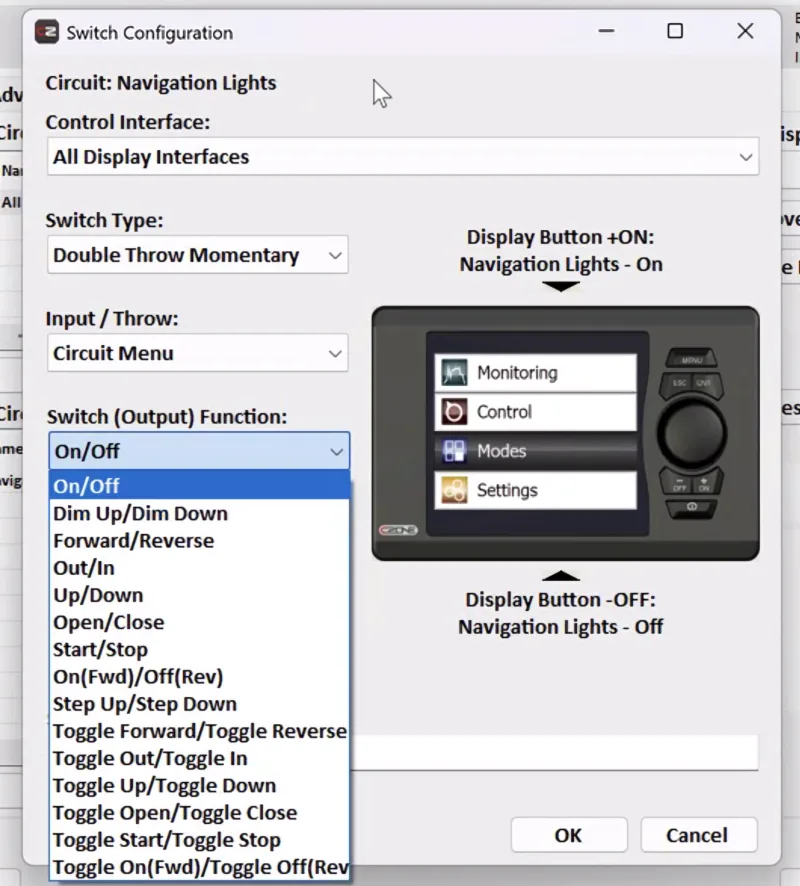
On/Off gives Zora a plain on and off Click Write Config to Network.
Each bank's card then shows Resolved, and its circuits appear under Name Your Switches. A circuit left on Toggle needs its Zora switch in pulse mode; see CZone compatibility.
Name the switches
Name Your Switches lists every switch Zora knows: those found on NMEA 2000, and every relay on a Modbus board you have set up. Each card shows where the switch is before you name it:
| Source | Shown as |
|---|---|
| NMEA 2000 | Bank 3 · Switch 2 and the brand |
| Modbus relay | the RS485 line or the converter's address, then Address 1 · Relay 4 · Modbus relay |
- Give each switch a Name. It is what the crew sees on the dashboard and on a switch widget.
- Choose a Category: Lighting, Navigation, Pumps, Climate, Entertainment, Power or Other.
- Tap Save Names. It is inactive until something changes.
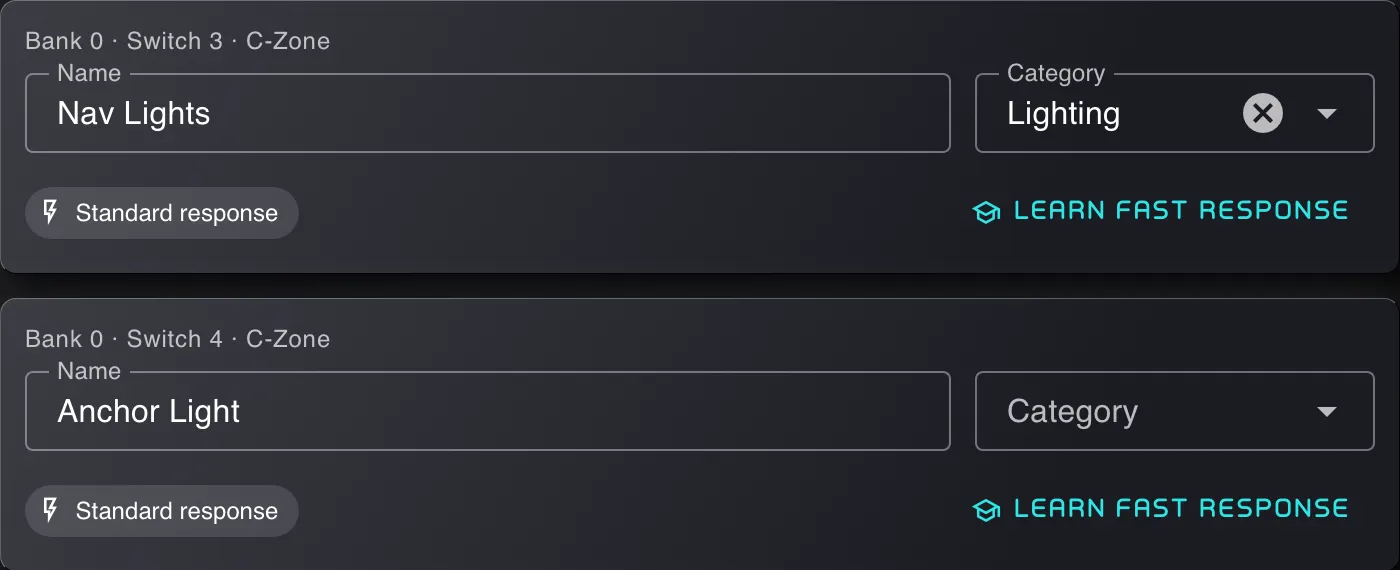
A switch keeps its identity through a rename, and through being rewired, so names and categories can be changed whenever you like. A later scan never overwrites them.
An empty list means no switching device has been detected and no Modbus board has been set up. A newly added Modbus board's relays appear after the server restarts.
Fast response on CZone
A CZone switch reports its state on a slow cycle, so the screens can lag a press. Once Zora has learned the device's fast status message for a switch, it follows that instead, about ten times faster. Zora learns it on its own after the switch has been used normally a few times, and drops it again if it stops matching. Each CZone card shows which it uses: Standard response, or Fast response in green.
To learn it now:
- Make sure it is safe to switch that circuit now.
- Tap Learn fast response, or Relearn if it has been learned before.
- Tap Start. Zora switches the circuit on and off four times, over about 12 seconds.
The circuit really switches
Learning operates the circuit. Stop ends it at once and switches the circuit off. When a learn finishes, the circuit is left as it was.
One circuit learns at a time. If Zora could not learn it, it says so: try again, or switch it on and off by hand a few times.
Only CZone switches have this. A Modbus relay is read back directly, so there is nothing to learn.