

Look-ahead view New in 3.36.6
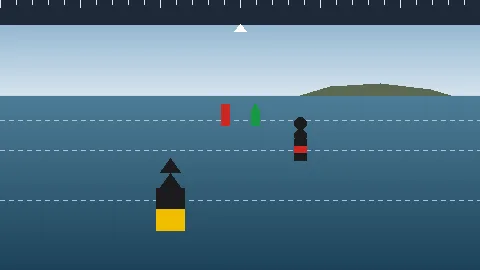
The Look-ahead view shows the chart ahead of the bow the way you see the water from the helm, in perspective, out to 3 nm and 10° either side. It draws what can put the boat in trouble and nothing else from the chart. It reads the charts on board, so it works without internet.
Add it
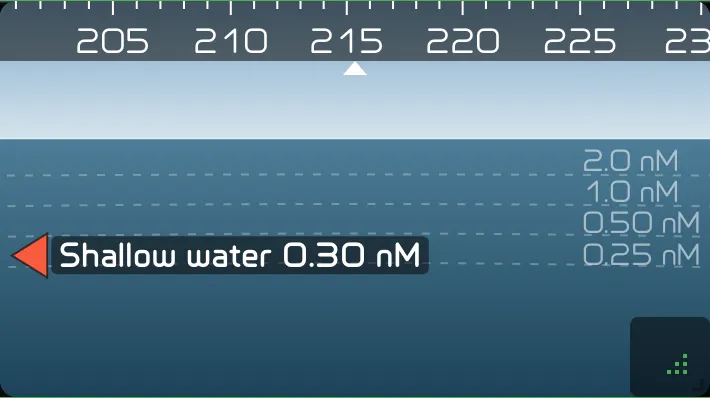
In edit mode, tap Add Content, open the nav tab and choose Look-ahead view. It needs at least 16 by 9 cells. The widget has no settings of its own.
Which way it looks
The view looks along the boat's heading, averaged over the last 10 seconds. With no heading, it looks along the course over ground while the boat makes 0.5 kn or more. The compass tape across the top shows that direction. Dashed range rings lie on the water at 0.25, 0.5, 1 and 2 nm. Distances, depths and clearances are in the units set in the units tab: metres or feet close in, nautical miles or kilometres from a quarter of a mile out.
What it shows
- Land, where the chart has it.
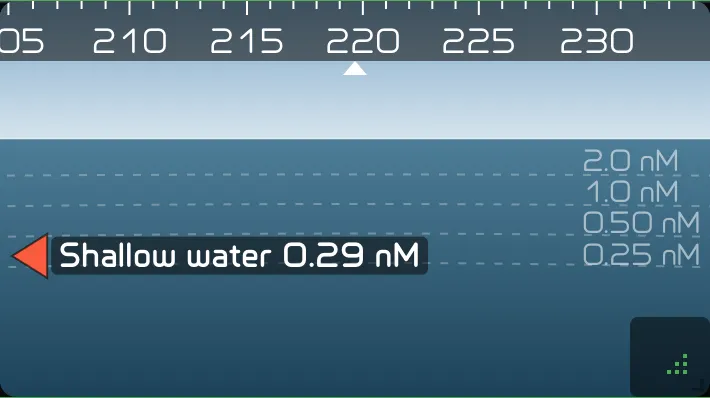
- Shallow water, tinted: water less deep than the boat's draft plus the keel margin set in Hazard Settings (0.5 m unless you change it), and any depth area the chart shades at your Depth Shading setting (in the units tab). With no draft entered in My Boat, Zora takes 2.5 m.
- Rocks, wrecks and obstructions with less water over them than the deeper of those two depths, or with no depth charted. Each is a symbol on the water in a dotted ring: a cross for a rock, a hull and masts for a wreck, a dot for an obstruction.
- Cardinal, lateral, isolated danger and special buoys and beacons. Above each one, on a stem, is its chart symbol, drawn smaller the further away the mark is: a red square for port and a green triangle for starboard with the mark's number, a cardinal's topmark on yellow, black with a red band for isolated danger, and a cross on yellow for a special mark. A lateral beacon charted grey or brown keeps that colour and gets a red or green topmark for its side. A special mark painted black and yellow like a cardinal shows as that cardinal. Safe water marks are left out.
- Bridges, overhead cables and overhead pipes lower than your air draft plus 2 m, drawn as a line in the air at their charted clearance and labelled with it. With no air draft in My Boat, every one shows. One with no clearance on the chart always shows, with a question mark for its height.
- Water the charts do not cover, tinted and labelled Uncharted.
The next mark and gates
The nearest mark in view is the next mark. A beam in its colour drops onto it from the compass tape, with its distance on the beam above the horizon, and chevrons beside it point the side to pass it on. A special mark is never the next mark, since it has no side to pass. A cardinal is passed on its named side. A lateral mark is passed on its channel side, towards the nearest mark of the other colour within 0.5 nm, so the chevrons are right going in or out. When no such mark is near, a lateral mark shows no chevrons.
A port and a starboard mark within 300 m of each other make a gate, joined by a line. When one of them is in view, the other is drawn too, as long as it is ahead of the beam. On a gate, the chevrons point between the two marks.
A mark more than 1 nm away fades into the background. The further away it is, the fainter it draws, down to about a third of full strength at 3 nm. The next mark, a mark that carries the distance of the hazard ahead, and a mark you tap always show at full strength.
Lights at night
At night, each light on those marks flashes its charted rhythm in the colour you would see from the boat. A sector light shows the colour of the sector you are in, and stays dark when you are outside all of them. An alternating light changes colour from one flash to the next. An ultra quick light flashes too fast for the screen to follow, so the view draws it as a steady star in its colour, day and night. The rest of the view dims so the screen does not dazzle you. Only lights on the marks show. By day the view shows none except those stars. It switches to night with the Night colours in the chart list, or on Auto from dusk.
Details
Tap a mark, a rock, wreck or obstruction, or the clearance of a bridge or cable. A panel opens in the sky above it, with a line down to what you tapped. It gives the name, what it is, its distance, and its light as the chart writes it (such as Fl(2) R 6s), its depth or its clearance. Tap it again, or tap the water, to close the panel.
The hazard ahead
When Zora raises a hazard notification, the view marks that hazard in the colour of the notification:
- In view, a ring on the water where the hazard lies, with a ⚠ above it and its distance. When a mark stands within 80 m of it, the mark carries the distance and the hazard keeps its ring.
- Off to one side, an arrow at that edge of the view, with the kind of hazard and its distance.
The hazard stays on the view if you mute the notification, and goes when the notification clears.
When it cannot draw
A message in the view says what is missing:
- No position: Zora has no fresh position fix. The compass tape still shows the direction when there is one.
- Charts not available: the view could not read the charts on board for the water ahead, so it draws nothing from them. It still marks the hazard Zora warns you about.
- No heading: Zora has no fresh heading, and the boat is not making the 0.5 kn the view needs to follow the course over ground.
On a slower display
When a display cannot keep up, the view first draws at a lower resolution, then in flat shapes. It shows the same things either way and stays readable instead of stuttering.